XFrontier first demo (alpha.0) is now released. The archive can be downloaded here :
http://www.divshare.com/download/19830622-156

Le journal d'un bidouilleur en informatique
vendredi 12 octobre 2012
Found another awesome site today : Fabien Sanglard's website . Lots of interesting subjects for game developpers ! Among others gems, an article about the old famous game Another World, implemented through an adanced architecture : the game engine was a virtual machine, and the game logics and rules were entirely implemented in the bytecode executed by the virtual machine; we can also find an introduction about the doom3 game engine !
vendredi 5 octobre 2012
Lost week
Last sunday my dev laptop PC crashed; I have some recovery DVD, but I loose 1 day or 2 searching for them; more than that, they dont work very well, so it needed a lot of attempts to achieve Windows installation; after that, I spent some times reinstalling all my dev softwares : MSVC, AC3D, svn Tortoise, Downloading and installing DirectX SDK, etc... Finally it took me 5 evenings to get back to the point where I was stopped last sunday. I am now ready to continue XFrontier developpment, but in brief I loose the week.
vendredi 7 septembre 2012
XFrontier progress : Dialog popups, game events, flight dynamic model and much more...
I'm very close now to achieve the 1st X-frontier prototype (PROTO1.ALPHA); however, let's make a little point of what was achieved (or started) those last weeks.
- Dialogs boxes : jpeg format SUCKS for color keying
During holidays I added Dialog boxes display and interaction to the 2D manager interface. The dialog box frame is defined as a 2D texture, so it's stored in a .bmp or .jpg file. An inportant point to my eyes was that I wanted arbitrary 2D clipping for the dialog frame, rather than strictly rectangular. To do it, I added color keying technique in the 2D rendering shader, and let's define pure green (0,255,0) as the color key. I designed the 2D dialog box texture as following :

As I tested it for the first time, the dialog box rendering was quite wrong : the green colored-parts, supposed not to be displayed, were rendered except for some random pixels, as you can see in the following screenshot... WTF ?
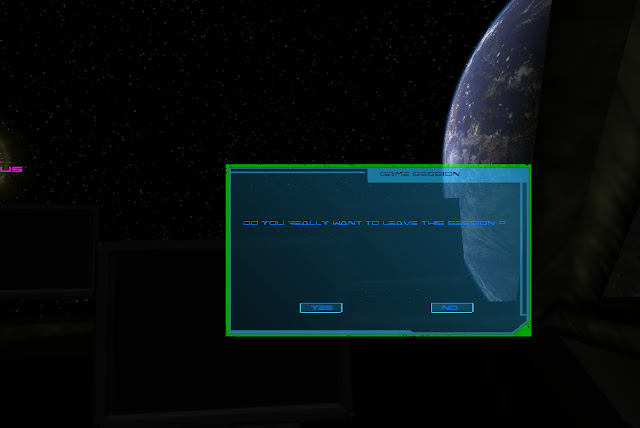
I spent quite an hour trying to fix that problem. Finally, I founded the explanation (while seated on the beach) : The pixels supposed to be 'pure green' were not really at (0,255,0) value because I stored the dialog frame texture in a ... jpeg file. Most of the pure green pixels for color keying were degraded due to the destructive jpeg compression. Once texture stored in a bmp file, everything worked fine:

Much better like that, hey ?
The previous lua code line create the "cargo" class. The 1st argument is the name a modder wants to give to the vessel class. Modders will need to give this name for further function that offers modification on the vessel class.
The 6 last arguments are the vessel instance start location in the universe : galactic sector (0, 0, 0), position (in kilometers) from the center of this sector: -22000.0, 0.0, 65050.5.
The 1st argument is the vessel instance name. The 2nd argument is the zone on the vessel instance where the player point of view must be positionned. The 3rd argument is the label to display of the corresponding menu entry.

As I tested it for the first time, the dialog box rendering was quite wrong : the green colored-parts, supposed not to be displayed, were rendered except for some random pixels, as you can see in the following screenshot... WTF ?

I spent quite an hour trying to fix that problem. Finally, I founded the explanation (while seated on the beach) : The pixels supposed to be 'pure green' were not really at (0,255,0) value because I stored the dialog frame texture in a ... jpeg file. Most of the pure green pixels for color keying were degraded due to the destructive jpeg compression. Once texture stored in a bmp file, everything worked fine:

Much better like that, hey ?
- Game start menu
I added Lua function to create what I call an 'entry point' in the game. An entry point is a place (typically, a pilot seat in the cockpit) in an instance of ship class, located somewhere in the universe. To define an entry point in the game, a modder must :
- Declare a new vessel classes; for example :
create_vessel_class( "cargo", "cargo.grb", "cargo.hie" )
The previous lua code line create the "cargo" class. The 1st argument is the name a modder wants to give to the vessel class. Modders will need to give this name for further function that offers modification on the vessel class.
The 2nd argument give the name of the "GRB" file (graphic resources base) for the cargo (containing meshes, textures, shaders and rendering effects). The 3rd argument give the name of the "hierarchy" file, wich describes how the different components of the .grb file (engines, main body of the vessel, cockpit,...) are hierarchized.
- Declare where in the ship class is located the player point of view; for example
add_vesselclass_playerzone( "cargo", "cockpit_pilot_seat", 0.0, 8.1, -17.10, "Body", 1 )
The previous lua code snippet create a zone in the "cargo" class. A zone is a physical place in the ship where the player point of view is located : for example, cockpits, passengers cabins, corridor... There will be 2 zones categories : "static", and "non-static". "Static" category is a zone where the player cannot walk, the only enabled movment for the point of view is moving the head (typically, the pilot's seat). "Non-static" category is a zone where the player can evolve as in a classic FPS game : moving the head, and walking around (typically cabins, corridors, the whole cockpit). In the previous lua example we declare a static zone in the cockpit, over the pilot's seat.
The 1st argument is the vessel class name a modder previously created and where he wants to add a "zone".
The 2nd argument is the zone name; modders should give this name for further function that allow zone interconnections in the vessel class. The arguments 3,4 and 5 defines X,Y,Z position of the static zone point of view in the vessel 3D meshe. The argument 6 is the name of the meshe where the previous X,Y,Z position is relative. This name must correspond to an existing entry in the hierarchy file. The argument 7 declare the zone category : 1 for static, 0 for non-static. The non static zone are not currently implemented.
- Now it's time to instantiate a vessel from the previously defined class. Let's call it 'Nostromo' :)
register_vessel_from_class( "Nostromo", "cargo", -22000.0, 0.0, 65050.5, 0, 0, 0 )
The 6 last arguments are the vessel instance start location in the universe : galactic sector (0, 0, 0), position (in kilometers) from the center of this sector: -22000.0, 0.0, 65050.5.
- Now we have a vessel located somewhere in the galaxy, let's say we want a menu entry to start the game on the Nostromo's pilot seat:
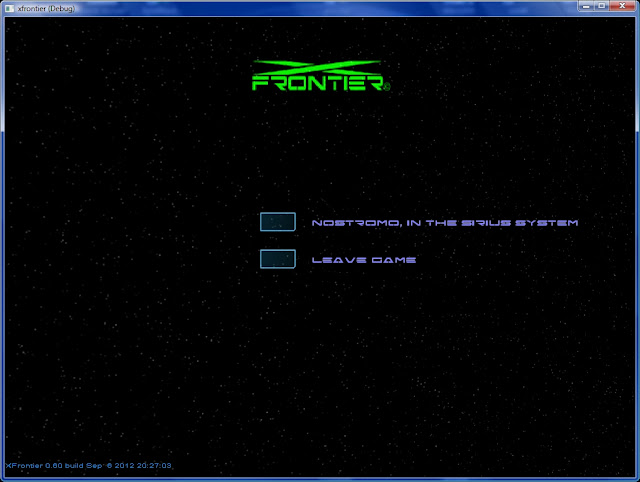
add_game_entrypoint( "Nostromo", "cockpit", "Nostromo, in the Sirius system" )
The 1st argument is the vessel instance name. The 2nd argument is the zone on the vessel instance where the player point of view must be positionned. The 3rd argument is the label to display of the corresponding menu entry.
Once the game started, the start menu appears like this:

- Collision boxes type selection from Lua
For Collision detection I use ODE capabilities. ODE allow different collision shapes on objects :
- SolidSphere
- SolidBox
- SolidCylinder
- SolidMeshe
The 'SolidMeshe' has the highest accuracy in collision detection, but it's also the one with the highest CPU cost. In early dev version of the XFrontier prototype, only this last one was available for vessel and stations. Last week I added the possibility to choose (via Lua commands) SolidSphere or SolidBox instead; here is the Lua code example :
-- declare cargo vessel class
create_vessel_class( "cargo", "cargo.grb", "cargo.hie" )
-- bounding sphere for "Body" object meshe
set_vesselclass_collision( "cargo", "Body", "sphere" )
-- bounding box for "Engine1" object meshe
set_vesselclass_collision( "cargo", "Engine1", "box" )
-- bounding box for "Engine2" object meshe
set_vesselclass_collision( "cargo", "Engine2", "box" )
-- bounding box for "Engine3" object meshe
set_vesselclass_collision( "cargo", "Engine3", "box" )
For Collision detection I use ODE capabilities. ODE allow different collision shapes on objects :
- SolidSphere
- SolidBox
- SolidCylinder
- SolidMeshe
The 'SolidMeshe' has the highest accuracy in collision detection, but it's also the one with the highest CPU cost. In early dev version of the XFrontier prototype, only this last one was available for vessel and stations. Last week I added the possibility to choose (via Lua commands) SolidSphere or SolidBox instead; here is the Lua code example :
-- declare cargo vessel class
create_vessel_class( "cargo", "cargo.grb", "cargo.hie" )
-- bounding sphere for "Body" object meshe
set_vesselclass_collision( "cargo", "Body", "sphere" )
-- bounding box for "Engine1" object meshe
set_vesselclass_collision( "cargo", "Engine1", "box" )
-- bounding box for "Engine2" object meshe
set_vesselclass_collision( "cargo", "Engine2", "box" )
-- bounding box for "Engine3" object meshe
set_vesselclass_collision( "cargo", "Engine3", "box" )
- Game events manager
I started to implement management of what I called "High-level Game events"; In XFrontier, the only 'moving' objects (at least in the earlier version) should be the vessels. So the main high-level game events will be :
- a vessel colliding another vessel
- a vessel accosting a station
- a vessel colliding a station
- a vessel colliding a planet ground
- a vessel landing on a planet ground
- a vessel near a gas giant or a star (!!!!)
I want a callback system triggering a function in the game core for each of those events, in the aim to launch appriopriate actions; for example, when a vessel collide a station, taking into account velocities and directions at the collision instant, the core game can put the incriminated vessel in one of those states:
- only giving some minor/major failures in vessel's equipements and/or giving this one a quite incontrolable trajectory/rotation.
- Vessel explosion/destruction (and game over if it's the player's vessel)
So, it seems that there is three main event type :
EVT_APPROACH : the vessel is quite near another object
EVT_ACCOST : the vessel landed on planet ground or is connected to station airlock
EVT_COLLIDE : collision with another object
Here is a sheet giving some examples of consequences/reaction of game core for each case of event:

Maybe later, in practice it will appears that I need more events type, or maybe I'm totally wrong, who can say ? Wait and see. But I feel there's a lot of advantages in such architecture : making code more clean and easy to modify, and in the modding aspect, mission creation through Lua scripting should be more easy with those high-level game events.
- Flight dynamic model for space ships
Flight of behaviour of vessels in planet atmosphere should be quite realistic, but this can be hard to implement. After some research on the web I found JSBSim, an open source dynamic flight model, written in C++; this one is used by the open source flight simulator FlightGear. I'm currently reading the documentation (excellent), so for the moment I can't tell yet if this one could be integrated in XFrontier, but I hope so... Anyway, this will not be in the XFrontier PROTO1.ALPHA release, because I want to release this last one as soon as possible, so player vessel flight behaviour will be (for the moment) a very basic and unrealistic flight model.
vendredi 22 juin 2012
Counting code lines in your project...
Last week I discovered this nice tool for code lines counting. The HMI is very intuitive, and the results are quite detailed (with a graphic chart); it supports most of the common langages; the tool can also display the commented code line ratio ! :-p
http://www.ab-tools.com/en/software/universalcodelinescounter/
After applying this on my project X-Frontier : approximatively 50000 code lines, with only 5% of commented line (sooooo bad!!!)

http://www.ab-tools.com/en/software/universalcodelinescounter/
After applying this on my project X-Frontier : approximatively 50000 code lines, with only 5% of commented line (sooooo bad!!!)

mercredi 6 juin 2012
3D modelisation for X-Frontier
After some holidays, back to bizness ;)
For X-Frontier I need some models of stations and space ships. 3D modeling is a task I dont like very much, I'm not very good in it, so I dont want to spend a lot of time to learn how to use complex 3D modelisation software like Blender or GMax (a free version of 3DS Max). I need SIMPLES and efficients tools.
In 2003 I discovered a small and simple 3D modeler called AC3D. 30 minutes only are necessary to learn how to use it !!
One other interesting feature of the software is the texture mapping tool, quite intuitive and easy to use ! And finally, AC3D allow to save model on disk through a human readable text file format; I writed a parser for the AC3D files in my homegrown 3D engine to import all 3D models created with this software.
In the other hand, the main inconvenience is, while the 2003 version (3.6) is a simple modeler, you cannot create very complex objects !
Recently I choose to use Google Sketchup to create complex 3D objects. The problem is that google sketchup only allow object export in the collada format (an xml format for 3D meshes), quite complexe to parse, and as I didnt want to spent time to write a new parser for my 3D engine, I started researches for a tool that allow conversion from collada format to a file format compliant with my old AC3D version (3.6).
I visited the AC3D web site (http://www.inivis.com) and I noticed that the last version (6.8.14) was compliant with the collada format.
Furthermore, 6.8.14 version bring some interesting improvements, like boolean operations, extrusion, enhanced texture mapping, triangle selection directly in the 3D view, and more !!!
So I finaly decided to buy the license (this is not a free software !) for the 6.8.14 AC3D version ! (around 120 $)
3D models production chain for X-Frontier is the following :
- Starting the rough complex meshe under Sketchup. Exporting in the collada format
- Importing the collada format under AC3D.
- With AC3D : adjusting the model (moving/correcting some vertex/face, adding details), and setting texture mapping coordinates.
- Saving the model in the AC3D file format.
- Importing the AC3D file format in my 3D engine framework, converting the model to my 3D engine data format.
Some models yet created:
Space city :


Space station (texture mapping not finished !) :


Ship : a small commercial cargo (work in progress)


mercredi 9 mai 2012


Inscription à :
Articles (Atom)